# Action Network Email creating mode with HTML (not knowing how to code in HTML)
Creating a Donate Button on Emails in Action Network
URL to use for donations for The Big One (updated on 10/01/2023):
https://chuffed.org/project/thebigone
URL to be used for Extinction Rebellion UK Fundraiser (updated on 01/12/2022):
https://chuffed.org/xr/uk
In Email creating mode with HTML (not knowing how to code in HTML):
1. Download the Donate Button Image here:
https://drive.google.com/file/d/1J8cIWNedbgRwkVvigHekMM1JMxsHBrF7/view?usp=share_link
2. Add Image to the email:
[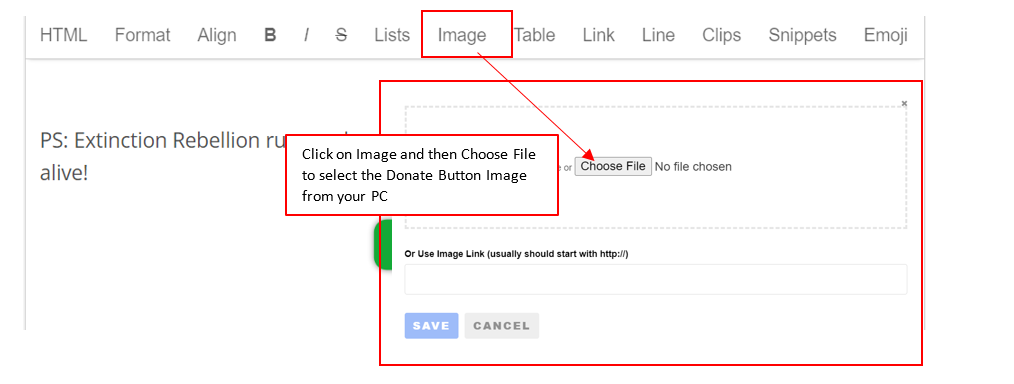](https://rebeltoolkit.extinctionrebellion.uk/uploads/images/gallery/2022-12/3a-image.png)
3. Add Fundraising URL to the image
Click on the Donate Button Image in the Email body which opens the following window:
[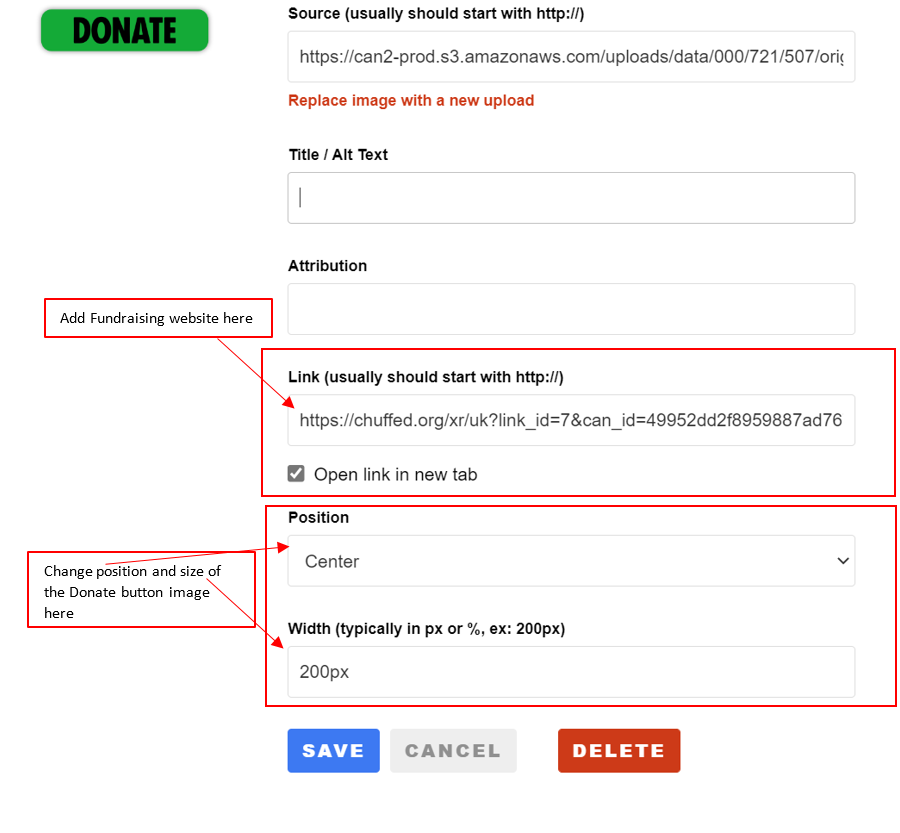](https://rebeltoolkit.extinctionrebellion.uk/uploads/images/gallery/2022-12/4-image.png)